How to Upload Clipart to Etsy So Buyers Find Every File
To upload clipart to Etsy, create a digital listing, export your clip art as PNGs (plus SVGs if you sell cut files), group them into ZIP files of 20 MB or less, and attach up to five files.[1] Five ZIPs hold up to 100 MB, which fits a lot of clip art sets. With Pick Up My Files, you upload the set once, group it into a Bundle and connect the listing, and buyers open a download page in your branding where they see every design with a preview and take the whole set with Download all.
Getting the files onto the listing is the quick part. What decides whether buyers are happy is what happens when they open the set: whether the PNG they want is easy to find, whether the cut file loads in their machine, and whether they know what they’re allowed to make with it.
What Etsy accepts for clip art
Etsy’s rules for instant-download listings, checked on Etsy Help on 2026-11-18:[1]
- Up to five files per listing, each up to 20 MB.
- PNG, JPG, PDF and ZIP are supported. SVG, DXF, EPS and AI aren’t on Etsy’s list, so cut files and vector files go inside a ZIP.
- Buyers see your file names exactly as uploaded, and you can’t rename them afterwards. Names can use up to 70 letters, numbers, periods, underscores or hyphens.
- No variations, so you can’t sell “PNG only” and “PNG plus SVG” as options on one listing.
Clip art adds up fast. A PNG 3,600 pixels square, which prints at 12 inches at 300 dpi, holds about 52 MB of raw pixel data once you include the transparency channel. PNG compression shrinks that, a lot for flat shapes and line art, far less for watercolor textures and painted detail. So there’s no fixed number of images per listing.
The bigger issue is what the buyer sees. A clip art set on Etsy arrives as a few ZIP names. The designs inside stay invisible until the buyer unzips them, and Etsy notes that buyers on phones and tablets may need a file manager or another app to do that.[2] Clip art shops also tend to sell the same designs more than once, in themed mini sets and a mega bundle, and on Etsy each of those listings carries its own copies of the files.
How to deliver clip art with Pick Up My Files
Pick Up My Files keeps the sale on Etsy and gives your set a page of its own. Etsy delivers the thank-you PDF we attach to the listing, and the PDF opens your download page. Here is the setup, in the order the app works.
1. Connect your Etsy shop
Connect your shop and import your digital listings in a few clicks. Your mini sets and bundles come across without retyping.
2. Upload the set once
Drop in your folders of PNGs and cut files, single files, or the ZIPs you already send. Each file is checked for viruses, stored privately and given a preview. If you upload a design you already have, it’s kept once instead of twice.
A ZIP stays one file, the way you made it, and buyers can look inside it before downloading. If you’d rather they never unzip anything, unpack it with one click and keep its files together as a Bundle.
3. Group the designs into Bundles
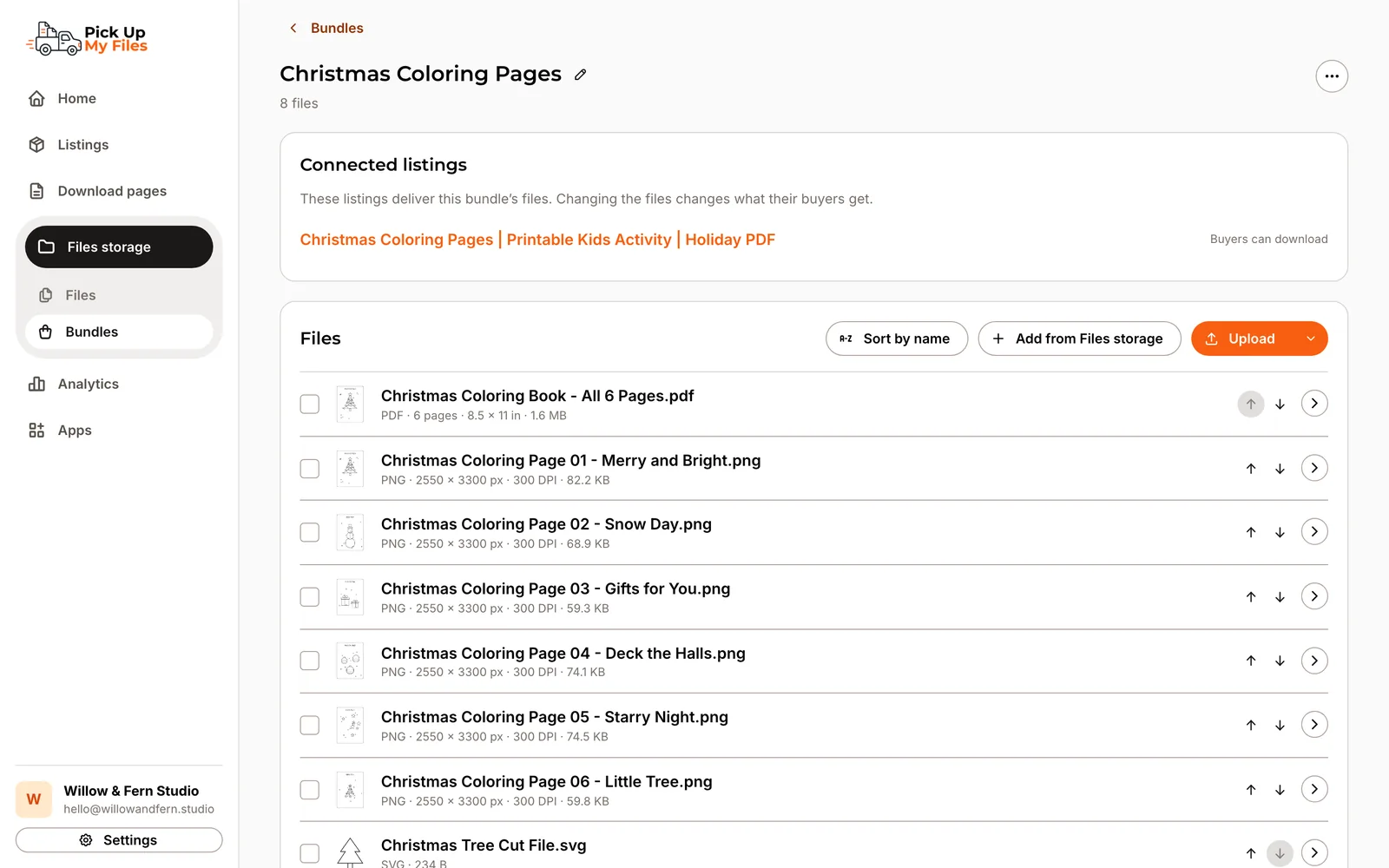
A Bundle is a set of files with a name. Upload a folder and we offer to turn it into one, or select files and choose Create bundle. Arrange the files by hand or sort them by name, so the order matches the numbers on your preview image.
Bundles work like tags, not folders. One design can sit in your Spring mini set and your mega bundle at the same time without being copied. Connect each Bundle to every listing that should deliver it. A listing can also deliver more than one Bundle, such as a PNG set and an SVG set, and buyers then see the Bundle names.
4. Write your cutting machine steps once
Clip art buyers ask the same things: which file goes in the cutting machine, how to use the PNGs in their design app, what they may make. Write that once as a product guide. Under Listings, start from a blank guide or a ready-made one for a common product type, such as SVG cut files, then make it your own: a one-line summary, what buyers will need, numbered steps and short tips. Attach it to the listings it belongs to. One guide can serve many listings.
5. Build your page once and connect the listings
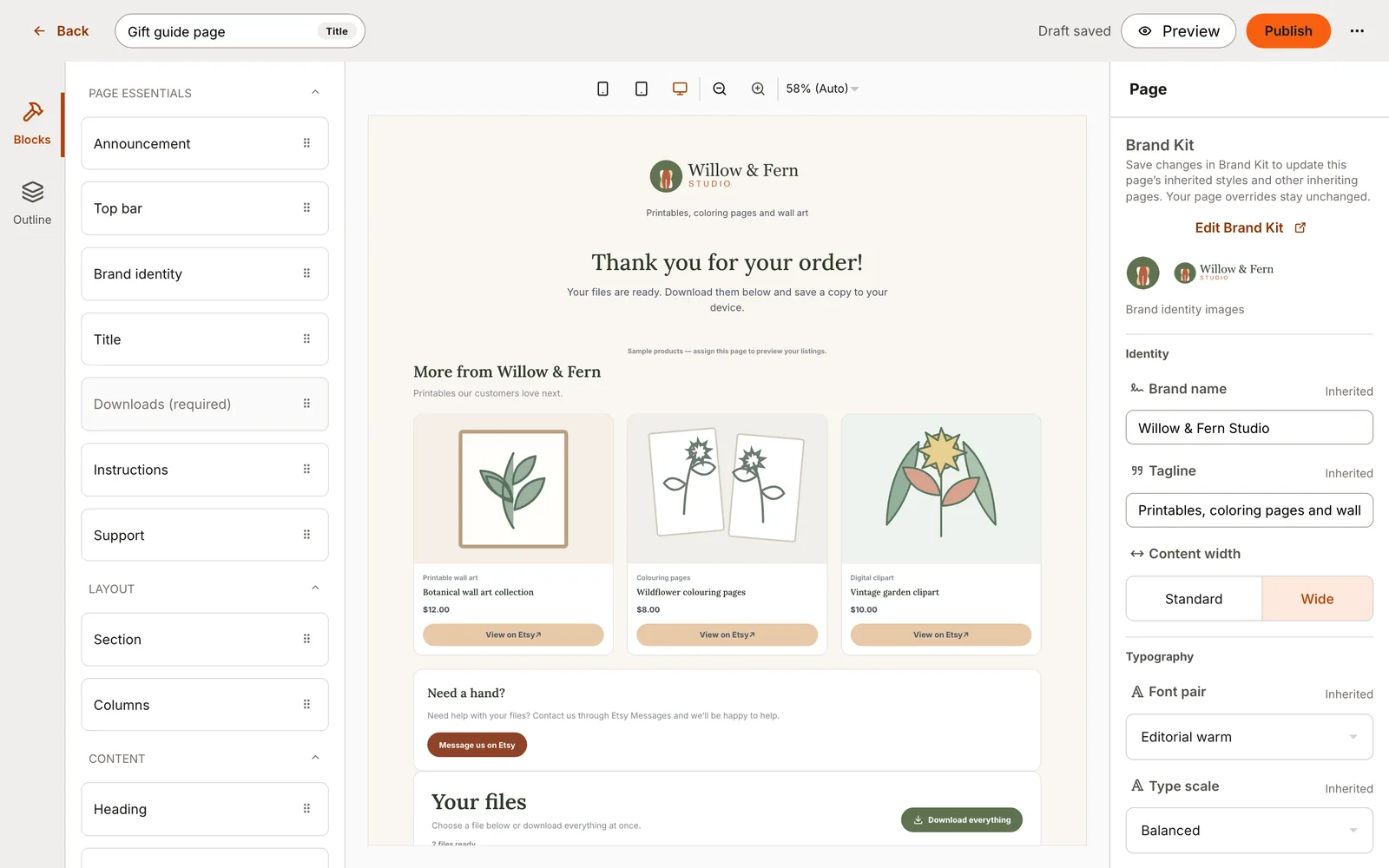
Your effort goes into one download page, which works as a template for your listings. It starts with the delivery essentials in place, and your Brand Kit, with your logo, colors, fonts and button style, is applied to it. Add the Guide block, and each buyer sees the guide for the listing they bought. Then connect each listing to its Bundle.
We make the thank-you PDF for each listing you connect and attach it on Etsy, on every plan. You don’t make it or upload it.
What the buyer sees
The buyer taps the button in the PDF and opens your page, with no sign-in. Download all comes first, with the file count and total size. Below it, every design appears with a preview, and buyers can open any one full screen before they download it. Each file says what it is and how big it is, with short help tags for things like transparent backgrounds and ZIP files. For a big bundle, the layout becomes searchable shelves, with search and Select for a buyer who wants only a few designs.
Your guide sits beside the files, and small info buttons and a help page cover the download itself, so buyers can get started without writing to you first.
When you fix a design
Change a file once and every listing that delivers it has the new version, the mini set and the mega bundle alike. Before you save a change to a Bundle, we tell you which listings deliver it and that their buyers will see the change. Buyers who bought months ago open the same link in their PDF and find the fixed design, or the bonus paper you added.
Show buyers your other sets
On Growth and Pro, add a product recommendations block to your page. Choose what it shows: more from the same category, something from a different one, or any of your listings, ordered by best match, most favorited, newest or price, as a grid, list or carousel. The block follows the listing the buyer came from, so a buyer of your Spring set can see your Summer set. Every recommendation opens the listing on Etsy, where they buy the way they did the first time.
If you’re not using it yet: package the set for Etsy
Without a download page, the set goes on the listing as ZIPs. Some shops with bigger collections instead build a PDF by hand for each listing, linking to a shared folder. That folder looks like everyone else’s, shows file names instead of designs, has to be relinked in every PDF when it moves, and does nothing to bring buyers back. If you deliver on Etsy, a few steps make the ZIPs easier to use.
- Export the final files. PNG for clip art with transparent backgrounds. JPG suits digital paper and backgrounds, which don’t need transparency and come out much smaller.
- Trim empty transparent space around each image and export at the size you promise, not larger.
- Check the transparency by opening a few PNGs over a colored background.
- Sort files into folders by format, as in the table below.
- Zip each group, keeping every ZIP at 20 MB or less with a little room to spare.[1] The guide to ZIP files for Etsy covers naming and splitting them.
- Unzip a fresh copy and open some files from it. That’s what your buyer receives.
- Describe exactly what’s included: the number of images, formats, pixel size, dpi, and how many ZIPs the buyer will download.
| Folder | What goes in it | Who uses it |
|---|---|---|
PNG |
Transparent images at full size | Canva, Procreate, printing, stickers, most crafters |
SVG |
Vector cut files | Cutting machine software that imports SVG |
DXF |
Cut files in a second format | Buyers whose cutting software doesn’t import SVG |
JPG |
Digital paper and backgrounds | Scrapbooking, printing, design backgrounds |
Inside each folder, name files with the set name and a number, such as Spring-Florals-01.png, matching the numbers on your preview image. A set that won’t fit in five ZIPs can be split into themed mini sets plus a mega bundle listing, at $0.20 USD per listing,[3] with every fix re-uploaded to each listing that holds the design.
State your usage terms. Clip art buyers almost always ask whether they can sell items made with your designs. Put a short summary of your terms in the listing description and the full terms in the download. If your clip art uses elements from Canva, a font or another creator, their license decides what you can pass on; the guide to Canva licensing rules for Etsy sellers covers the Canva side.
Answer the download question. Buyers can’t download digital purchases in the Etsy app. They need a web browser at Etsy.com, then Purchases and Download Files, and guest buyers use the link in their receipt email.[2] Etsy also lets you add one note that buyers see on their Downloads page.[1] For a buyer stuck on a ZIP, send this guide to downloading Etsy files.
Questions sellers ask
Can I upload SVG files to Etsy?
Not on their own. SVG isn’t one of Etsy’s supported file types, so put SVG cut files in a ZIP, which Etsy does accept.[1]
How many clipart images can I upload to one Etsy listing?
There’s no image count. The limit is five files of 20 MB each.[1] Zipped, that’s up to 100 MB in total, so the number of images depends on how big each one is.
Can I resend one design to a buyer through Etsy?
Yes, for some types. Etsy Messages carries up to three JPG, GIF, PDF or PNG files per message, so a single PNG can go there, but a ZIP or SVG can’t.[4]
Let buyers see every design
You can start with Pick Up My Files for free, with the thank-you PDF made and attached for you. See how it works.
Sources
[1] Etsy: How to Manage Your Digital Listings (checked 2026-11-18)
[2] Etsy: How to Download a Digital Item (checked 2026-11-18)
[3] Etsy: Etsy Fee Basics (checked 2026-11-18)
[4] Etsy: How to Send Messages to Buyers (checked 2026-11-18)