Change the Etsy Digital Download PDF Link on 100 Listings

To change the Etsy digital download PDF link on 100 listings, stop rebuilding PDFs. Connect your listings to Pick Up My Files once, and we make a new thank-you PDF for each one and attach it on Etsy for you. Each PDF opens a branded download page for that product, and its link never changes again, so this is the last time you touch the delivery file on those listings.
Etsy has no bulk tool for digital files, so the do-it-yourself version means rebuilding every PDF with the new link and swapping it by hand on every listing. That’s worth avoiding twice.
Why there’s no shortcut on Etsy
Etsy’s bulk edit tool covers titles, tags, descriptions, prices, custom options, production partners, renewal options, processing profiles and shipping profiles. Digital files aren’t on that list, and Etsy has no way to bulk upload listings.[1] The listing spreadsheet you can download holds titles, descriptions, prices, quantities, tags, materials, image URLs and SKUs, but no digital files.[2]
So every swap happens in the listing editor, one listing at a time: add the new file, remove the old one with the X, save. Etsy won’t save an instant-download listing with no file attached, and file names can’t be edited after upload.[3] Four steps, 107 times, plus 107 PDFs to make first.
The bigger problem is that the job comes back. A link to a Drive folder only works while that folder stays where it is and holds the right files. Etsy Community threads describe buyers landing in the wrong Drive folder because an old link was left inside a PDF.[4] Move a folder, rename an account or reorganize your drive, and the PDFs need rebuilding again.
Past buyers make it harder still. Sellers in the Etsy Community report that buyers keep the files from the time of purchase,[6] so everyone who bought before a switch still has the old PDF with the old link inside. People come back to planners, teacher resources and templates months later, and that old link is the only way they have back to their files.
How to switch every listing with Pick Up My Files
With Pick Up My Files, the PDF stops being something you make. Your effort goes into one download page template, and the PDFs follow from it. Here’s the order the setup runs in.
1. Connect your Etsy shop
Authorize Pick Up My Files once from your Etsy account. We import your digital listings with their titles, prices, photos and tags, so there’s nothing to retype. New products you add on Etsy appear on a later sync, so listing number 108 won’t need its own setup project.
2. Upload your files and group them into Bundles
Upload the files buyers receive. A Bundle is a named set of files that a listing delivers, and it often matches a Drive folder you already have. Upload a folder and we offer to turn it into a Bundle. A listing with more than one file gets its own Bundle automatically, named after the listing.
If several listings deliver the same files, such as a single design, a themed set and a mega bundle that holds them all, connect one Bundle to each of them. A file lives once and can sit in any number of Bundles, so there are no copies of copies to keep in step. Later, before you add or remove files in a shared Bundle, we tell you which listings deliver it and that their buyers will see the change, so a fix meant for one product never surprises the buyers of another.
3. Build one download page
This is where your time goes, and it only happens once. A download page works like a template: it reads the listing each buyer arrived from and shows that product’s files, previews and product guide. One page can serve all 107 listings, or you can make separate pages for different product lines, such as one for planners and one for clip art. Either way, each buyer sees only the product they bought, not a folder of everything you sell.
Your Brand Kit puts your logo, colours, fonts and button style on every page, so the page looks like your shop rather than a shared folder. Add your how-to steps and a short Q&A, and every listing that uses the page has them.
4. Connect each listing
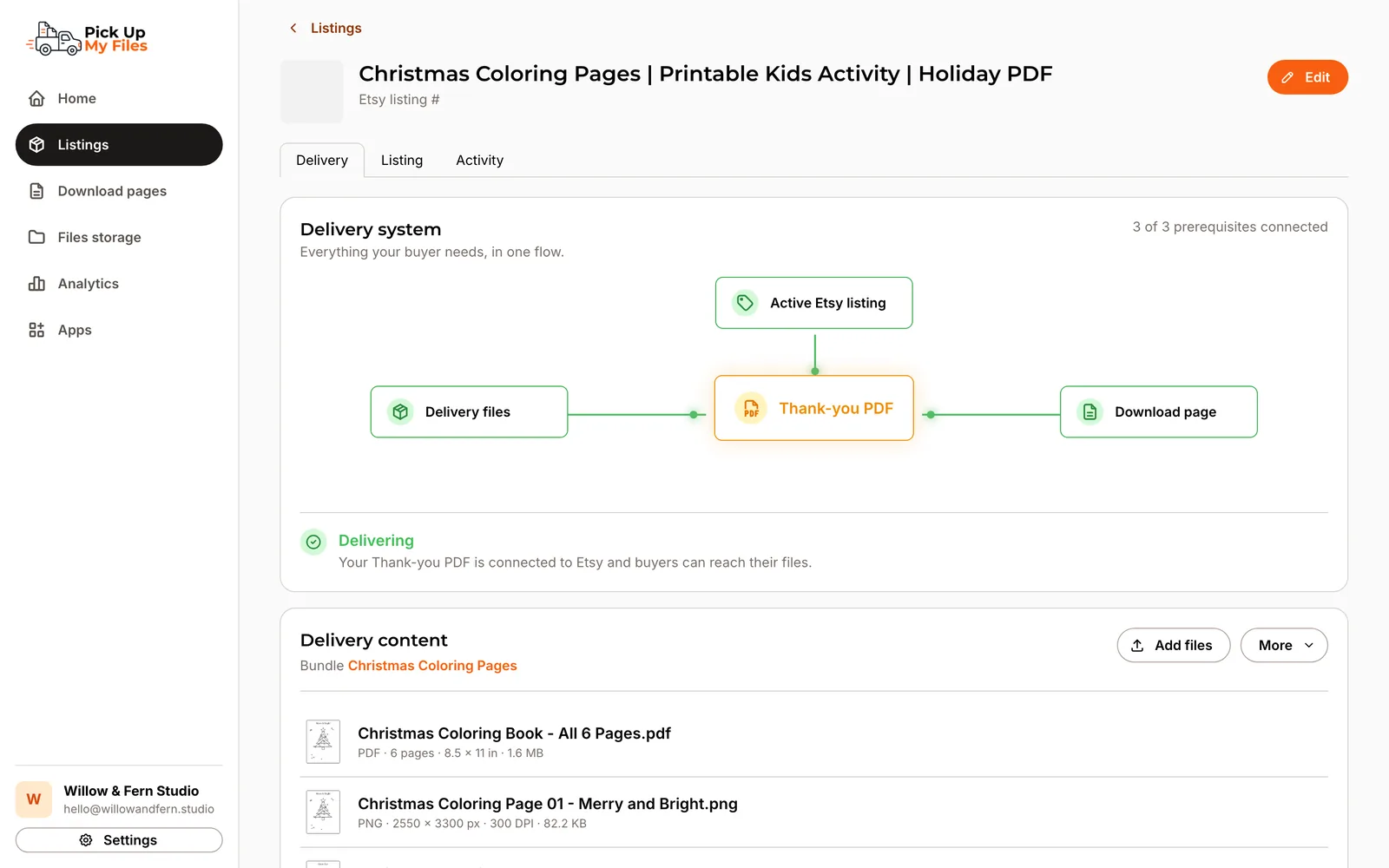
For each listing, pick the page and the files it delivers. We generate its thank-you PDF and attach it on Etsy for you. There’s no PDF to design, export, name or upload, and no listing editor to open.
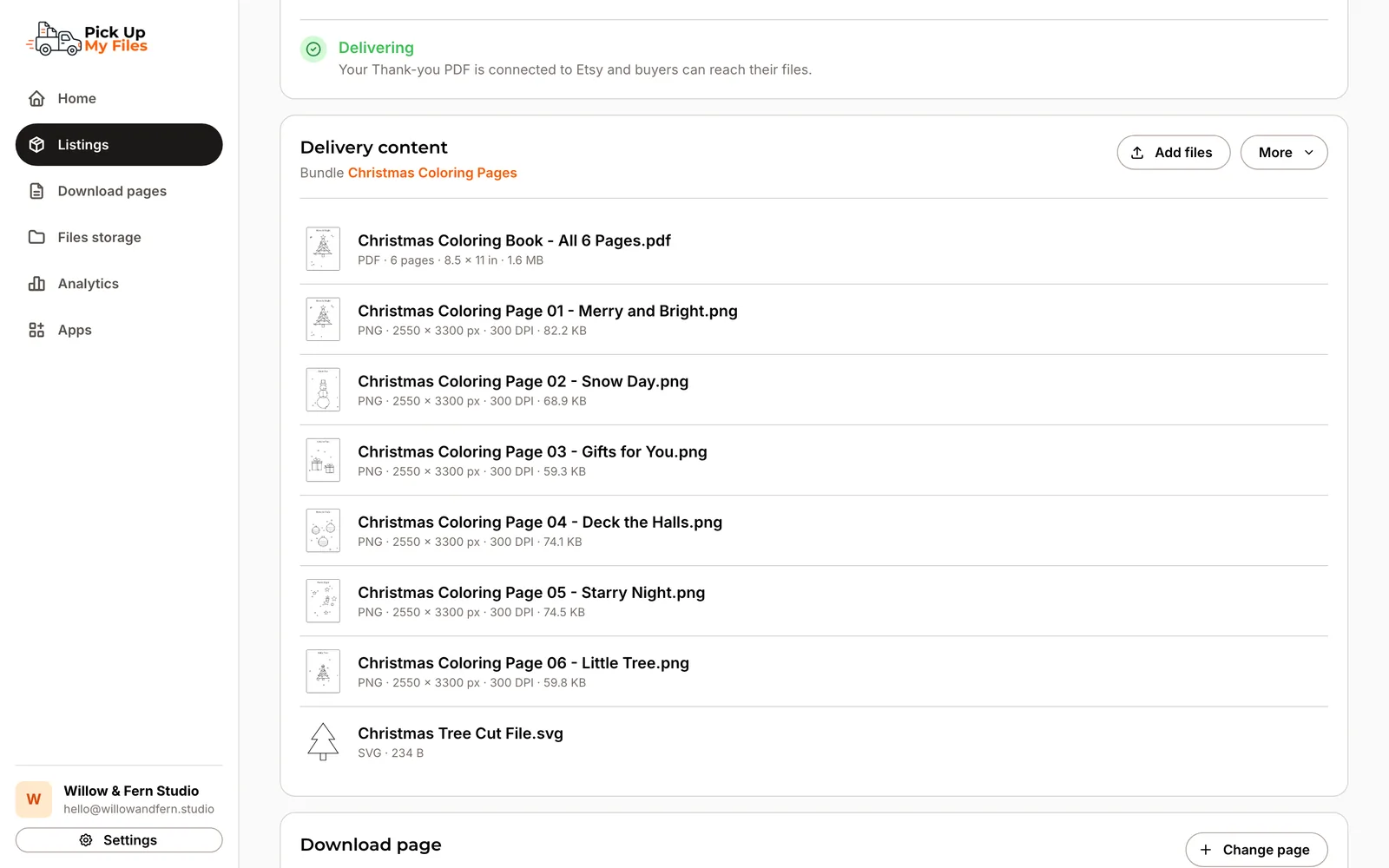
Start with the listings that sell most often, so they move to the new delivery first. A short checklist on your Home screen walks you through each step, from connecting Etsy to choosing who can download.
5. Check delivery status across the catalog
Your listings show which ones are connected to a download page, which files they deliver, and whether their thank-you PDF is on Etsy. Listings that need attention stand out, and the ones that are fine stay quiet. That replaces the spreadsheet of dates and ticks you’d otherwise keep for a 107-listing swap.
If your listing descriptions mention the old delivery method, update them with Etsy’s bulk edit tool, since descriptions are on its list.[1]
What buyers see
A buyer downloads the thank-you PDF from their Etsy purchase as usual and taps its button. Instead of a folder, they get a small website for the product they bought: your branding, their files with previews, Download all first with the file count and total size, your how-to steps and answers to common questions. Help for the download itself is built in. They don’t sign in, and the page works on a phone as well as a computer.
Why it’s the last switch
The link in each PDF stays the same from now on. Replace a file in a Bundle, rewrite a step in your guide or change the page layout, and every listing connected to it shows the new version through its existing link. Buyers who bought last month or last year see your latest files the next time they open their PDF. Change your logo in the Brand Kit, and every page picks it up. None of it needs a new PDF or a trip to the Etsy listing editor.
Look after buyers from before the switch
Buyers who bought before you connected a listing still have your old PDF, with your old link inside. Keep those folders shared and in place, so their links keep working. If one of them can’t open their files, help them from their order in Etsy Messages.
If you’re not using Pick Up My Files yet
Most shops handle a link change by hand: rebuild each thank-you PDF with the new link, often with Canva’s Bulk Create on a paid Canva plan,[5] then swap it on every listing one at a time. It works, but the PDFs need rebuilding again with every new listing and every moved folder. The buyer still lands in a shared folder that looks like everyone else’s, past buyers keep whatever link they were given, and nothing on that folder brings anyone back to your shop. The steps above replace the whole cycle with one page you keep current.
Questions sellers ask
Can one download page really serve 107 listings? Yes. The page reads the listing each buyer came from and shows that listing’s files and guide. Use one page for everything, or one per product line.
What happens when I add a new listing next month? It appears in Pick Up My Files on a later sync. Connect it to a page and its files, and we attach its thank-you PDF on Etsy.
Do I have to remake the PDFs if I change my files later? No. Change the files or the page, and buyers see the update through the same link.
Make this the last time you touch the PDFs
Connect your best sellers first and see the page your buyers will get. Try it free.
Sources
Etsy details checked on November 18, 2026.
[1] Etsy Help: Can I Create or Edit Multiple Listings at Once?
[2] Etsy Help: How to Download Your Listing Information
[3] Etsy Help: How to Manage Your Digital Listings
[4] Etsy Community: Digital Download PDF Link not going to the correct Google Drive Folder (the forum requires sign-in to read replies)
[5] Canva Help: Create designs in bulk (the page blocks automated reading; plan availability confirmed through search extracts of Canva’s help pages)
[6] Etsy Community: Are past buyers notified when a digital download they purchased is updated? (seller reports; the forum requires sign-in to read replies)