Etsy Digital Download Link Not Working? How to Fix It
When a buyer says their Etsy digital download link isn’t working, first find out which link they mean: Etsy’s own Download Files button, or the link inside the thank-you PDF on the listing. Trouble with Etsy’s button usually comes from the Etsy app, a payment that’s still processing or a guest checkout, and a few Etsy steps fix it. Trouble with the link inside the PDF usually comes from a shared folder’s settings or a file that moved. With Pick Up My Files that second kind goes away: we attach the thank-you PDF for each listing you connect, its link never changes, and it opens a download page with no sharing settings, sign-in or request access screen in the way.
A buyer in this spot has paid and has nothing yet. The download is the first thing they try after buying from you, so it’s part of what they bought, and a quick, kind fix is what they’ll remember about your shop.
Ask one question first
Before you change anything, ask:
Thanks for letting me know. So I can fix this quickly, can you tell me what you see? Are you stuck on Etsy’s page with the Download Files button, or did the PDF open and the link inside it doesn’t work? A screenshot helps if you can send one.
If they can’t get the PDF from Etsy, your files are fine and the fix is in how they’re downloading. If they have the PDF but its link fails, the problem is the link and whatever it points at.
When the buyer can’t get the files from Etsy
| What the buyer sees | Likely cause | Fix |
|---|---|---|
| No download option in the Etsy app | The app doesn’t download digital purchases | Use a mobile browser or computer |
| Download Files button is gray | Payment still processing | Wait a few minutes, then refresh |
| The order isn’t in Purchases | Guest checkout, or a different Etsy account | Use the receipt email, or sign in to the right account |
| Download Files does nothing | Ad blocker or browser add-on | Turn off add-ons and try again |
| The PDF won’t open | Damaged download or the wrong app | Delete it, download again, open it in a PDF app |
They’re using the Etsy app. This is the usual cause. Etsy says buyers “can’t download a digital purchase through the Etsy app at this time” and need to sign in on a mobile browser or a computer.[1] Send them these steps: open Safari, Chrome or another browser, go to etsy.com, sign in, open Purchases, then choose Download Files next to the order. For device-by-device steps, see why buyers can’t download digital files on the Etsy app.
The Download Files button is gray. Etsy says the button stays gray while payment is still processing.[1] Ask the buyer to wait a few minutes and refresh. If the order still shows as unpaid, they should check the payment itself on Etsy.
The order isn’t in Purchases. If the buyer checked out as a guest, Etsy puts the download link in the receipt email,[1] so ask them to search their inbox, spam and promotions folders. Otherwise they may be signed in to a different Etsy account. An old order is no obstacle: Etsy says there are generally no limits on when or how often a buyer downloads, unless the order is canceled.[1]
Download Files does nothing, or the PDF won’t open. Etsy suggests turning off ad blockers, toolbars and other browser add-ons, then trying again. For a file that seems damaged, Etsy’s advice is to delete it and download it again.[1] On a phone, opening the PDF from the Files app usually works better than a preview inside an email or messaging app.
How Pick Up My Files keeps the link working
Almost every failure on the other side, the link inside the PDF, has one root: the link in a downloaded PDF is fixed, while the files behind it move. Pick Up My Files turns that around. The link stays put, and what it opens is a page you can change.
1. Connect your Etsy shop
Import your digital listings in a few clicks, with their titles, prices, photos and tags.
2. Upload your files and build one page
Upload the files buyers receive and design one branded download page for your catalog. The page reads the listing each buyer arrived from and shows that product’s files, previews and guide. Buyers never reach a public folder, so there’s no sharing setting to get wrong and no request access screen.
3. Connect each listing
Pick a page and files for the listing, and we attach its thank-you PDF on Etsy. Each listing gets a PDF made for it, so there’s no link copied over from another product. Your listings show which page and files each one delivers and whether its PDF is on Etsy, and listings that need attention stand out.
4. Fix a file once, for every buyer
When a file needs fixing, replace it, or edit the guide or the page, in one editor. Your changes save as a working draft, and buyers keep seeing the published page until you’re ready. Preview the buyer view, then publish.
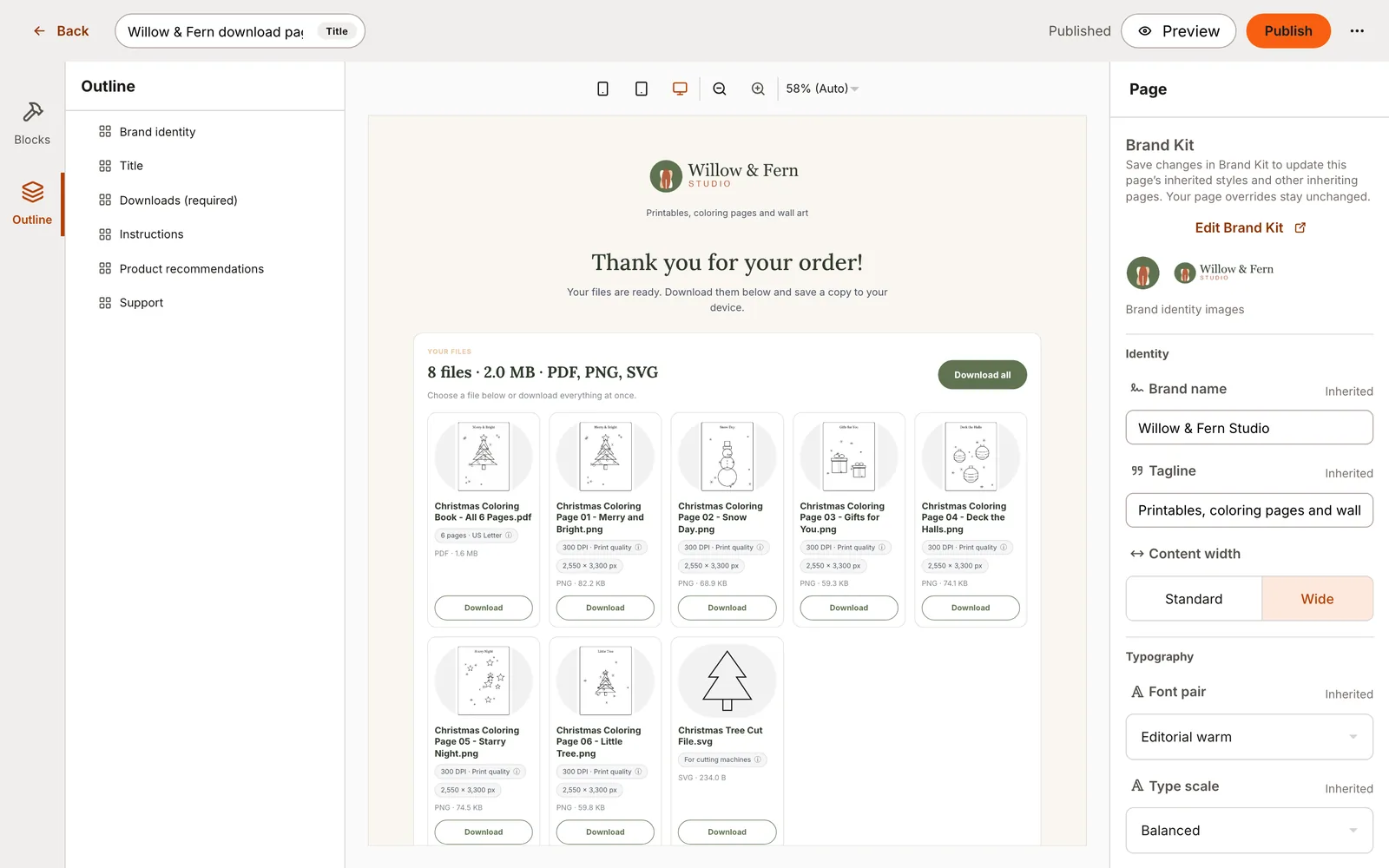
Every buyer opens the same link from the thank-you PDF they already have and gets the current version, including people who bought months ago. There’s no new PDF to make, no new link to send and nothing to change on Etsy.
What the buyer sees
The buyer taps the button in their PDF and their download page opens in your shop’s colours, with no sign-in. Download all comes first, with the file count and total size, and every file has a preview they can open full screen.
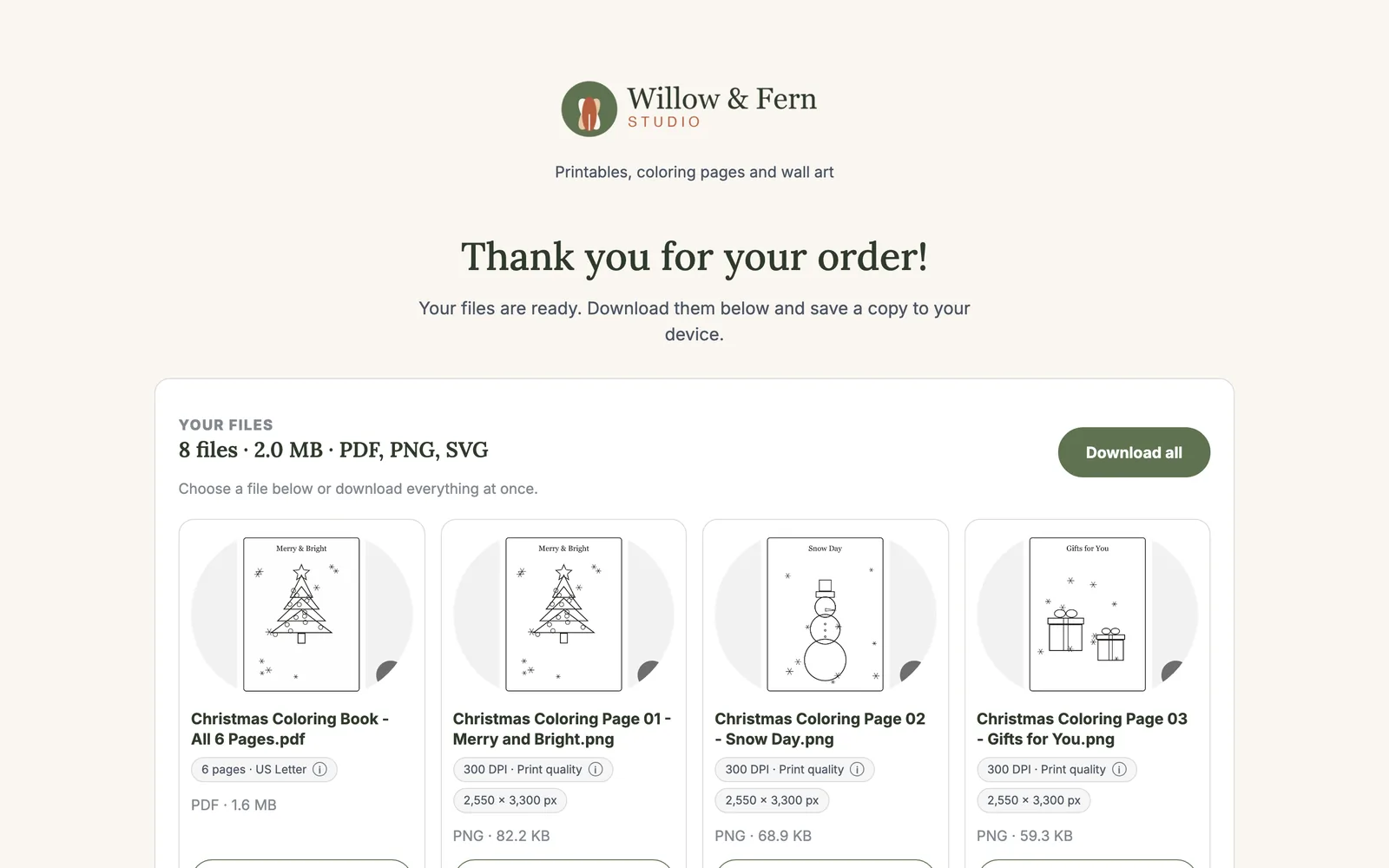
Help is built in. Small info buttons explain things like Download all and ZIP files, and every page links to a help page that follows your page’s own layout. A buyer who isn’t sure what to tap can usually sort it out there, without writing to you first.
The Etsy app step still applies, since buyers get the PDF from Etsy. Once they’ve downloaded it in a browser, the page opens in that same browser, on their phone or a computer.
A reply you can send
For a buyer whose listing delivers through Pick Up My Files:
I’m sorry about the trouble, and thank you for your patience. Please open etsy.com in your phone’s browser or on a computer (the Etsy app can’t download files), go to Purchases and choose Download Files. Open the PDF and tap the button inside. It takes you to your download page, where Download all gets everything at once. If anything still doesn’t work, let me know here.
Keep the conversation in Etsy Messages, where the order is.
If you’re not using it yet
Most shops today build a thank-you PDF by hand for each listing, with a button that opens a shared cloud folder or a template link. The common failures all come from that setup:
| What the buyer sees | What it means |
|---|---|
| A “You need access” screen on Google Drive | The folder is shared only with people you named, so a buyer has to ask for access.[2] |
| “Too many users have viewed or downloaded this file recently” | Drive’s temporary limit for popular files, which Google says typically resets within 24 hours.[3] |
| The link opens the wrong product | A link copied from another listing’s PDF. |
| “File not found” or a dead page | The file was deleted or replaced, so it has a new address. |
| Canva says the link is inactive | The template link was deleted, and Canva says a new one gets a new URL.[4] |
For the buyer waiting now, send them a link that works in Etsy Messages. The harder part is everyone else. Each fix means rebuilding the PDF and replacing it on the listing, and every buyer who already downloaded the old one keeps the broken link. The folder they reach looks like anyone’s, with no steps, no help and nothing from your shop. That’s the routine a download page replaces: one page template, and a PDF we attach for you that never needs replacing.
Whichever way you deliver, tell buyers before the sale. Say in the listing that files download in a browser, not the Etsy app, and repeat it in your Message to Buyers for Digital Items, which shows on the Downloads page.[5] Our guide to what buyers should find when they open your Etsy thank-you PDF covers the page side.
Frequently asked questions
Can I send the files through Etsy Messages instead?
Etsy Messages takes up to three attachments, and only as JPG, GIF, PDF or PNG.[6] That’s fine for a single small file, but not for a ZIP or a full set.
Why does a shared-folder link work for me but not for the buyer?
You’re signed in as the owner, so you skip the sharing checks the buyer hits. A download page needs no sign-in, and the buyer preview in the editor shows you the page as buyers will see it.
Does Pick Up My Files change how Etsy’s app works?
No. The buyer still downloads the PDF from Etsy in a browser. What changes is everything after they tap its button.
Try it on your own listings
You can start with Pick Up My Files for free, with a thank-you PDF attached to each one whose link keeps working. See how it works.
Sources
Etsy, Google and Canva details checked on November 18, 2026.
[1] Etsy Help: How to Download a Digital Item
[2] Google Drive Help: Share files from Google Drive
[3] Google Drive Help: Download a file
[4] Canva Help: Share your design as a template link (the page blocks automated reading; wording confirmed through search extracts)
[5] Etsy Help: How to Add or Edit Your Post-Purchase Message to Buyers