How to Upload Files Larger Than 20 MB on Etsy
Etsy doesn’t accept a digital file larger than 20 MB, and each listing holds up to five files.[1] To upload files larger than 20 MB on Etsy, you either change the file until it fits, or you upload the full-size files to Pick Up My Files and let Etsy deliver a thank-you PDF that opens your download page. There, the buyer gets every file at full size, with previews and Download all, on a page that looks like your shop.
Before you decide, check whether you have a size problem at all. Often you don’t.
Why the 20 MB limit matters
The limit is per file, not per listing. Five files of 20 MB each give you up to 100 MB in one listing, and that covers a lot of digital products: printable sets, worksheets, short planners and small clip art packs usually fit with room to spare.
It starts to bite when one file, or the whole product, is genuinely large:
- High-resolution wall art. A 24 x 36 inch print at 300 dpi is 7,200 by 10,800 pixels, and one file that size can pass 20 MB on its own. The guide to creating printable wall art covers sizes and ratios.
- Digital planners with hundreds of hyperlinked pages and full-color backgrounds.
- Large image sets such as clip art, digital paper, mockups and textures.
- Video and audio, where even a short file is big.
Making these fit has a cost. Export a poster at a lower resolution and it can look soft when printed large. Split a planner into parts and the buyer has several downloads to find and keep together. A ZIP doesn’t rescue you either: the ZIP itself must still be 20 MB or less,[1] and JPG, PNG and most PDFs barely shrink inside one because they’re already compressed.[5][6]
Select your files and check the total size. If no single file passes 20 MB and the whole product is under 100 MB, Etsy’s own slots may be all you need. If not, read on.
How to deliver large files with Pick Up My Files
Pick Up My Files keeps the sale on Etsy and moves the files to a download page made for them. Etsy still delivers a file, the thank-you PDF, so the order completes the normal way. The PDF opens your page, and the page holds the full-size files. Here is the setup, in the order the app works.
1. Connect your Etsy shop
Connect your shop and import your digital listings in a few clicks. Your products come across without retyping, so the listing you want to fix is already there when you need it.
2. Upload the full-size files
Upload the files your buyers should receive, the way they are. Drop in single files, several at once, a whole folder or the ZIP you already send. Big uploads carry on if your connection drops. Each file is checked for viruses, stored privately and given a preview, and if you upload a file you already have, it’s kept once instead of twice.
This is the step where the 20 MB problem goes away. The 7,200 by 10,800 pixel print goes up as you exported it, not as a compressed copy, and the planner stays one planner.
3. Group the files into a set
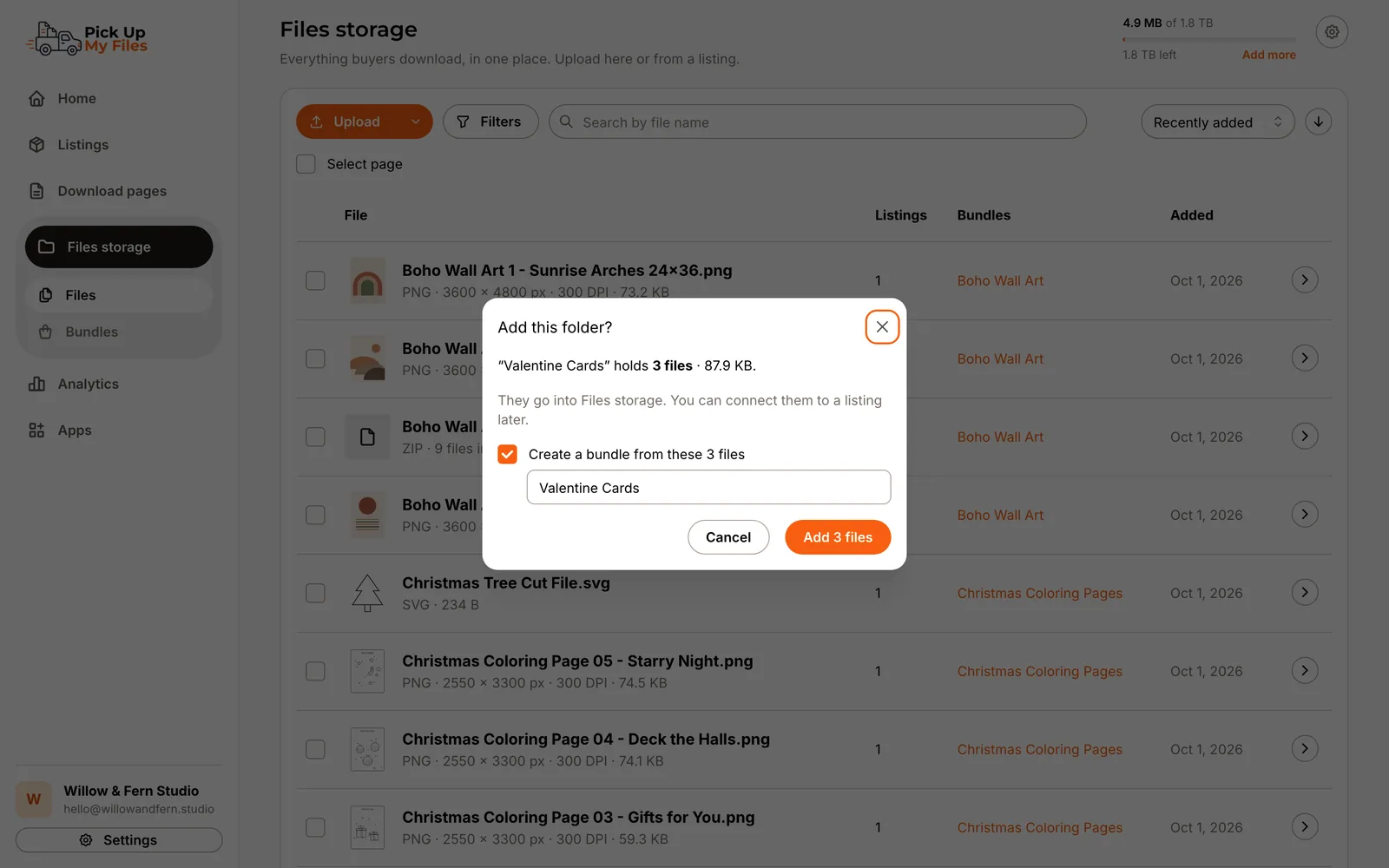
When a product has more than one file, it lives in a Bundle: a set of files with a name. Upload a folder and we offer to turn it into a Bundle. Add a second file to a listing and it becomes one automatically, named after the listing. You can also select files and choose Create bundle.
One file can sit in as many Bundles as you like, so a single print, a set of six and the full collection can share the same files without copies. Arrange the files by hand or sort them by name, and that’s the order buyers see.
4. Build your page once and connect the listing
This is where your effort goes: one download page, which works as a template for your listings. It starts with the delivery essentials already in place. Your Brand Kit, with your logo, colors, fonts and button style, is applied to it, so buyers see your shop rather than a file link. Then pick the file or Bundle the listing delivers.
One page can serve your whole catalog. It reads the listing each buyer arrived from and shows that product’s files, previews and product guide. You can also make separate pages for different product lines.
5. We attach the thank-you PDF on Etsy
We make the thank-you PDF for each listing you connect and attach it to the listing on Etsy, on every plan. You don’t make it, and you don’t upload it by hand. Its button opens your download page.
What the buyer sees
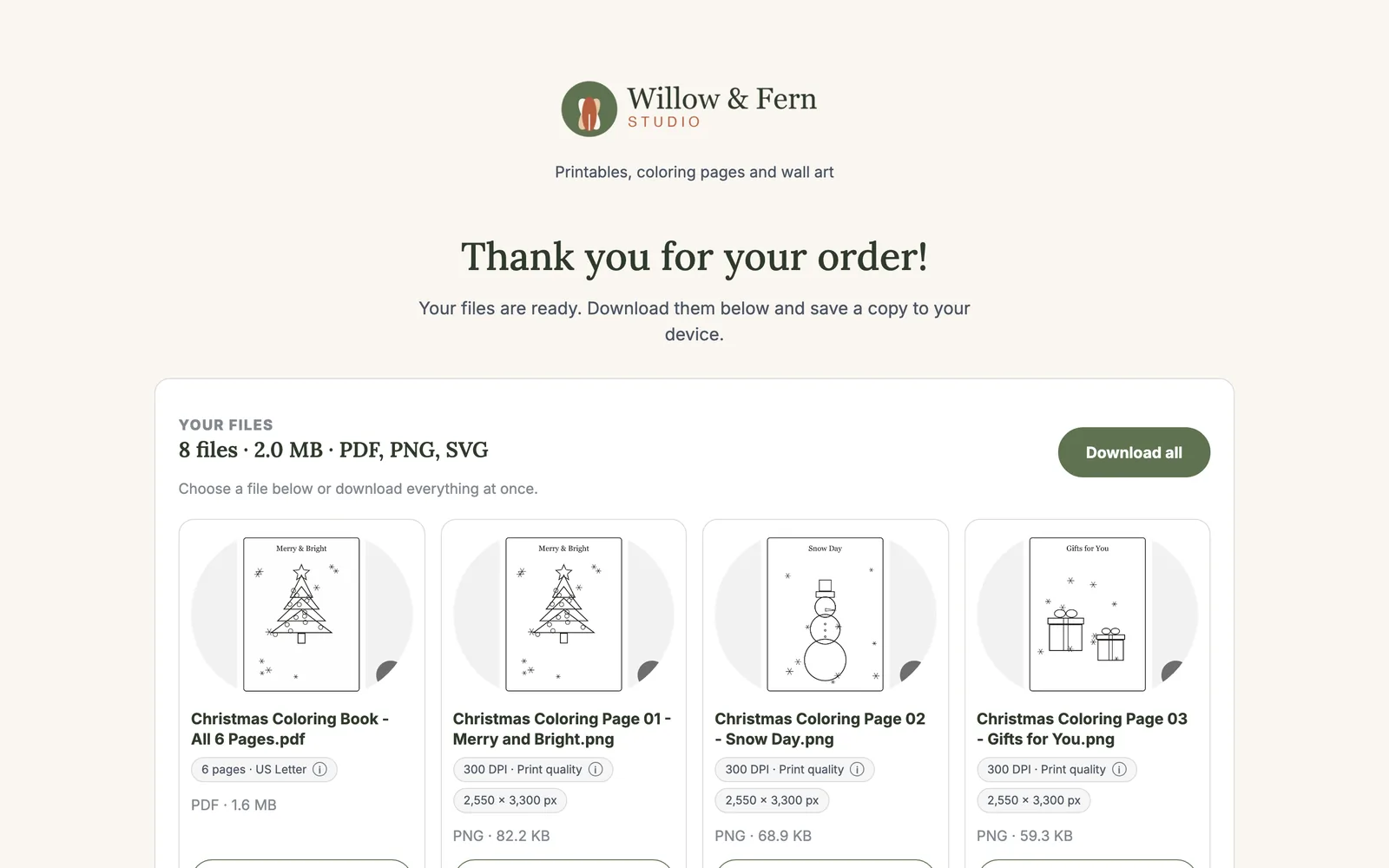
The buyer downloads the PDF from Etsy, taps the button and lands on your page, with no sign-in. Download all comes first, with the file count and total size, so they can get everything in one tap. Each file says what it is and how big it is. They can open any preview full screen, flip through a PDF’s first pages or look inside a ZIP before downloading, on a phone as well as on a computer.
If you’ve written a how-to guide for the product, such as how to print a large poster at a print shop, it shows right next to the files. Small info buttons explain things like Download all, and every page links to a help page, so buyers can sort out a download without writing to you first.
When you change a file
Large files are often the ones you re-export: a color fix, a new size, a corrected page. Change the file once and every listing that delivers it has the new version. Before you save a change to a Bundle, we tell you which listings deliver it and that their buyers will see the change.
Buyers who bought months ago open the same link in the PDF they already have and see your latest files. You don’t remake the PDF or touch the Etsy listing.
Buyers can see your other work
On Growth and Pro, a product recommendations block can show more of your Etsy listings further down the page, picked to match what the buyer just bought. Each one opens the listing on Etsy, where they buy the way they did the first time.
If you’re not using it yet: shrink or split
Without a download page, you have two ways to make large files fit Etsy’s slots, and one common way around them. Each has a cost.
Make the file smaller. For PDFs, most of the weight is in the images inside, so export at the resolution the buyer needs: 300 dpi is a common standard for printing, and a planner meant for a tablet screen needs far less. For artwork without transparency, JPG is usually much smaller than PNG at the same pixel size. Keep PNG when the buyer needs a transparent background, trim empty space around each image, and don’t export larger than the listing promises. Work on a copy and compare it at full size. If you see blur, banding or fewer sizes than you promised, stop.
Split one file into parts. Planners divide by quarter or section, wall art by aspect ratio, courses by module. Name each part so the buyer knows it’s one of several, such as Botanical-Planner-2027-Part-1-of-3.pdf. Buyers see file names exactly as you upload them, you can’t rename a file afterwards, and names can use up to 70 letters, numbers, periods, underscores or hyphens.[1] If you need more than five parts, see how to sell more than five files in one Etsy listing.
Link out to a shared folder. This is what most shops do today when files won’t fit: a PDF built by hand for every listing, with a link to a Google Drive or Dropbox folder shared with anyone who has the link.[3] It gets the files to the buyer, but it falls short in ways that grow with your shop. The PDF has to be rebuilt for every listing and every time a link changes. The buyer lands in a folder of file names that looks like everyone else’s, with nothing from your shop. When you fix a file, nothing tells past buyers, and nothing on the page brings them back to your shop. A Pick Up My Files download page is the same idea done for you: we make and attach the PDF, and its link opens a page in your branding that stays current. The Drive link and download page comparison shows both side by side.
Whichever route you choose, say in the listing how the files arrive, and tell buyers that downloads don’t work in the Etsy app. They need a mobile browser or a computer, then Purchases and Download Files; guest buyers use the link in their receipt email.[2] For anyone still stuck, this plain guide to downloading Etsy files is written for buyers.
Questions sellers ask
Can I ask Etsy to accept files larger than 20 MB?
No. The 20 MB per file limit applies to every digital listing, and Etsy Help doesn’t list a way to raise it.[1]
Does the order still complete on Etsy with a download page?
Yes. Etsy delivers the thank-you PDF we attach to the listing, so the purchase and the download on Etsy happen the normal way, and the PDF opens your page. Keep all buyer conversations on Etsy, and say in the listing how the files are delivered.
Can I send a large file through Etsy Messages instead?
Only some types. Etsy Messages accepts up to three JPG, GIF, PDF or PNG files per message, so a ZIP, SVG or video can’t be sent there.[4]
Try it on your largest product
You can start with Pick Up My Files for free, with the thank-you PDF made and attached for you. Start with the listing whose files never fit: see how it works.
Sources
[1] Etsy: How to Manage Your Digital Listings (checked 2026-11-18)
[2] Etsy: How to Download a Digital Item (checked 2026-11-18)
[3] Google Drive Help: Share files from Google Drive
[4] Etsy: How to Send Messages to Buyers (checked 2026-11-18)
[5] Microsoft Support: Zip and unzip files
[6] WinZip Knowledge Base: Why don’t some files compress very much?